
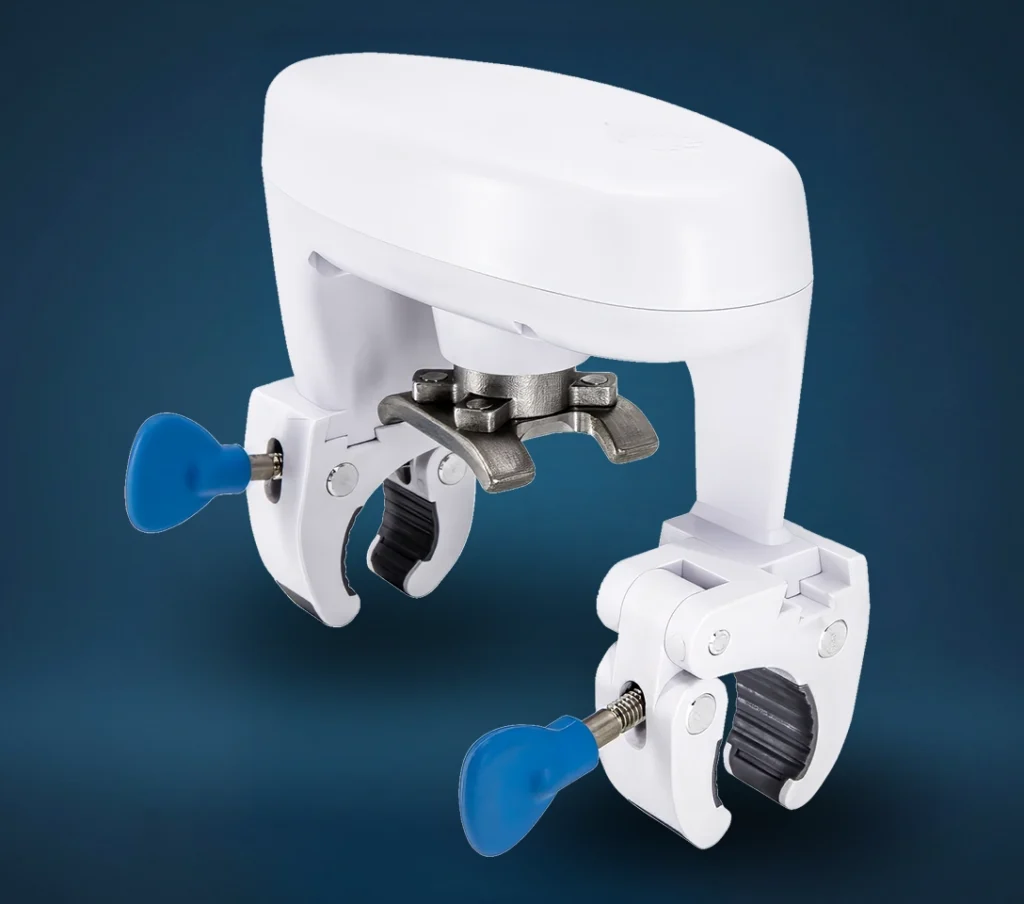
Specs
Product Name: Smart Water Shut-Off Valve
Manufacturer product name: IQ Water Valve
Device type: Retrofit smart water shut-off valve actuator
Main function: Opens and closes an existing water shut-off valve
Leak detection: Requires compatible flood/water sensors
Valve compatibility: Most ¼-turn ball valves
Pipe compatibility: ½” to 1¼” pipes
Communication: Z-Wave Plus 700 Series
Compatible systems: IQ Panel / IQ Platform systems
Installation type: Installs over existing compatible shut-off valve
Plumbing required: Usually no plumbing changes if the existing valve is compatible
Power: Plug-in power adapter
Kit Contents
Common kits include the valve plus compatible flood sensors
Documentation
Data Sheet
Installation Guide
Water Valve Flyer
LED Status:
- Flashing Yellow
Not yet included into the Z-Wave network or the touch sense button has been disabled. - Flashing Green
Include into the Z-Wave network.
Set to Factory Default
Option 1: Use the IQ Panel to “Clear” the Water Shut-Off Valve. This will remove it from the Z-Wave network and restore factory defaults.
Option 2: Press and hold the touch sense button for 10 beeps, then quickly press it 5 times in a row. If successful the Yellow LED will ash once, followed by the Green LED and a long beep.
Frequently Asked Questions
How does the Smart Water Shut-off Valve work?
The Smart Water Shut-off Valve is installed over your existing quarter-turn ball valve. When activated, it turns the valve handle to open or close your main water supply. It can be controlled through your compatible security system, and when paired with water sensors, it can help shut off water automatically if a leak is detected.
Does the Smart Water Shut-off Valve detect leaks by itself?
No. The Smart Water Shut-off Valve does not detect water on its own. It works with compatible flood or water sensors. The sensor detects water, then the system can tell the valve to close and shut off the water supply.
How do I manually open or close the Smart Water Shut-off Valve?
You can open or close the valve from your compatible app or panel if remote control has been set up. You may also be able to operate the valve manually at the device, depending on how it was installed. If the valve is not responding, check power, connection status, and whether the physical valve handle is obstructed.
Can I still use my water shut-off valve by hand?
Yes, but be careful. The Smart Water Shut-off Valve is mounted over your existing valve handle, so forcing the handle by hand while the device is attached can damage the unit or knock it out of alignment. If you need to manually operate the plumbing valve, contact Grand Alarms or follow the device removal instructions before forcing anything.
What type of plumbing valve does this work with?
The Smart Water Shut-off Valve is designed for most quarter-turn ball valves on pipes from ½ inch to 1¼ inch. It is not meant for every valve style. If your home has an older gate valve, seized valve, oversized pipe, or unusual plumbing setup, it may not be compatible without plumbing changes.
Where should the Smart Water Shut-off Valve be installed?
It is usually installed on the main water shut-off valve for the home. This allows the system to shut off water to the property if a leak is detected. In some cases, it may be installed on a specific water line, but main shut-off placement is usually the most practical option.
Can the Smart Water Shut-off Valve be installed outside?
The valve may be suitable for indoor or outdoor use, but it should be protected from direct sunlight and harsh exposure. If the shut-off location is outside, make sure the device is installed in a protected area and is not exposed to conditions that could interfere with operation.
What happens if my Smart Water Shut-off Valve loses power?
If the valve loses power, it may not be able to open or close remotely until power is restored. The water supply will usually remain in its last position, either open or closed. After power returns, test the valve to confirm it is back online and operating properly.
What happens during a power outage?
During a power outage, remote control may not work unless the connected system and network equipment have backup power. The valve should remain in its last position. Once power is restored, check the app or panel to confirm the valve is online.
Why is my Smart Water Shut-off Valve not responding in the app?
The most common causes are power loss, weak wireless signal, Z-Wave communication issues, the device being offline, or the valve being physically blocked. Check that the device has power, the panel is online, and the valve handle is not stuck or obstructed. If it still does not respond, contact Grand Alarms for support.
Why does the valve not fully open or fully close?
This usually means the device is misaligned, the plumbing valve is stiff, the valve handle is obstructed, or the valve needs recalibration. Do not force it. A stuck plumbing valve can damage the motor. Contact Grand Alarms if the valve is struggling to complete a full open or close cycle.
How do I test the Smart Water Shut-off Valve?
Use the app or panel to close the valve, then confirm that water flow stops at a nearby faucet. After testing, reopen the valve and confirm water flow returns. It is smart to test the valve periodically so you know it will work when you actually need it.
How often should I test the Smart Water Shut-off Valve?
A practical schedule is every few months, or any time plumbing work has been done in the home. You should also test it after a power outage, system service visit, or if the app shows the valve was offline.
Can I choose which water sensors trigger the valve?
In many setups, yes. Automation rules can be created so specific water sensors trigger the valve to close. For example, sensors near the water heater, laundry area, sump area, kitchen, or basement floor drain can be set up to shut off water if moisture is detected.
Why did my water shut off when there was no major leak?
The valve may have closed because a connected water sensor detected moisture. This could be from an actual leak, spilled water, condensation, cleaning, or a sensor being moved. Check all connected water sensor locations before reopening the valve.
What should I do after the valve shuts off my water?
First, check the area where the water sensor was triggered. Look near the water heater, laundry machines, sinks, toilets, sump pump, basement drains, and any other protected areas. Clean up any water, fix the source of the leak, dry the sensor, then reopen the valve only when it is safe to restore water.
Can I reopen the water from the app after a leak alert?
Yes, if the valve is online and the system allows remote control. Before reopening the water, make sure the leak has been found and the area is safe. Reopening water before checking the problem can make the damage worse. Water is very committed to being annoying.
Why does the Smart Water Shut-off Valve make noise?
Some motor noise is normal when the valve opens or closes. The device is physically turning your plumbing valve handle. Grinding, repeated struggling, or stopping halfway is not normal and may mean the valve is stiff, blocked, or misaligned.
Can the Smart Water Shut-off Valve prevent all water damage?
No. It can help reduce damage by shutting off the water supply when a connected sensor detects a leak. It cannot stop water damage from every source, such as roof leaks, sewer backups, groundwater, sump pump failure, or water entering from outside the home.
Who should I contact if the valve is offline, stuck, or not working?
Contact Grand Alarms for support. Do not force the valve, remove parts, or try to adjust the motor if you are unsure. The issue may be power, wireless communication, automation settings, alignment, or the plumbing valve itself.
Refer a Friend or Family Member
When someone you refer joins Grand Alarms, you’ll receive 2 months of free service as a thank-you.
Specs
Product Name: Smart Water Shut-Off Valve
Manufacturer product name: IQ Water Valve
Device type: Retrofit smart water shut-off valve actuator
Main function: Opens and closes an existing water shut-off valve
Leak detection: Requires compatible flood/water sensors
Valve compatibility: Most ¼-turn ball valves
Pipe compatibility: ½” to 1¼” pipes
Communication: Z-Wave Plus 700 Series
Compatible systems: IQ Panel / IQ Platform systems
Installation type: Installs over existing compatible shut-off valve
Plumbing required: Usually no plumbing changes if the existing valve is compatible
Power: Plug-in power adapter
Kit Contents
Common kits include the valve plus compatible flood sensors
Documentation
Data Sheet
Installation Guide
Water Valve Flyer
LED Status:
- Flashing Yellow
Not yet included into the Z-Wave network or the touch sense button has been disabled. - Flashing Green
Include into the Z-Wave network.
Set to Factory Default
Option 1: Use the IQ Panel to “Clear” the Water Shut-Off Valve. This will remove it from the Z-Wave network and restore factory defaults.
Option 2: Press and hold the touch sense button for 10 beeps, then quickly press it 5 times in a row. If successful the Yellow LED will ash once, followed by the Green LED and a long beep.
Frequently Asked Questions
How does the Smart Water Shut-off Valve work?
The Smart Water Shut-off Valve is installed over your existing quarter-turn ball valve. When activated, it turns the valve handle to open or close your main water supply. It can be controlled through your compatible security system, and when paired with water sensors, it can help shut off water automatically if a leak is detected.
Does the Smart Water Shut-off Valve detect leaks by itself?
No. The Smart Water Shut-off Valve does not detect water on its own. It works with compatible flood or water sensors. The sensor detects water, then the system can tell the valve to close and shut off the water supply.
How do I manually open or close the Smart Water Shut-off Valve?
You can open or close the valve from your compatible app or panel if remote control has been set up. You may also be able to operate the valve manually at the device, depending on how it was installed. If the valve is not responding, check power, connection status, and whether the physical valve handle is obstructed.
Can I still use my water shut-off valve by hand?
Yes, but be careful. The Smart Water Shut-off Valve is mounted over your existing valve handle, so forcing the handle by hand while the device is attached can damage the unit or knock it out of alignment. If you need to manually operate the plumbing valve, contact Grand Alarms or follow the device removal instructions before forcing anything.
What type of plumbing valve does this work with?
The Smart Water Shut-off Valve is designed for most quarter-turn ball valves on pipes from ½ inch to 1¼ inch. It is not meant for every valve style. If your home has an older gate valve, seized valve, oversized pipe, or unusual plumbing setup, it may not be compatible without plumbing changes.
Where should the Smart Water Shut-off Valve be installed?
It is usually installed on the main water shut-off valve for the home. This allows the system to shut off water to the property if a leak is detected. In some cases, it may be installed on a specific water line, but main shut-off placement is usually the most practical option.
Can the Smart Water Shut-off Valve be installed outside?
The valve may be suitable for indoor or outdoor use, but it should be protected from direct sunlight and harsh exposure. If the shut-off location is outside, make sure the device is installed in a protected area and is not exposed to conditions that could interfere with operation.
What happens if my Smart Water Shut-off Valve loses power?
If the valve loses power, it may not be able to open or close remotely until power is restored. The water supply will usually remain in its last position, either open or closed. After power returns, test the valve to confirm it is back online and operating properly.
What happens during a power outage?
During a power outage, remote control may not work unless the connected system and network equipment have backup power. The valve should remain in its last position. Once power is restored, check the app or panel to confirm the valve is online.
Why is my Smart Water Shut-off Valve not responding in the app?
The most common causes are power loss, weak wireless signal, Z-Wave communication issues, the device being offline, or the valve being physically blocked. Check that the device has power, the panel is online, and the valve handle is not stuck or obstructed. If it still does not respond, contact Grand Alarms for support.
Why does the valve not fully open or fully close?
This usually means the device is misaligned, the plumbing valve is stiff, the valve handle is obstructed, or the valve needs recalibration. Do not force it. A stuck plumbing valve can damage the motor. Contact Grand Alarms if the valve is struggling to complete a full open or close cycle.
How do I test the Smart Water Shut-off Valve?
Use the app or panel to close the valve, then confirm that water flow stops at a nearby faucet. After testing, reopen the valve and confirm water flow returns. It is smart to test the valve periodically so you know it will work when you actually need it.
How often should I test the Smart Water Shut-off Valve?
A practical schedule is every few months, or any time plumbing work has been done in the home. You should also test it after a power outage, system service visit, or if the app shows the valve was offline.
Can I choose which water sensors trigger the valve?
In many setups, yes. Automation rules can be created so specific water sensors trigger the valve to close. For example, sensors near the water heater, laundry area, sump area, kitchen, or basement floor drain can be set up to shut off water if moisture is detected.
Why did my water shut off when there was no major leak?
The valve may have closed because a connected water sensor detected moisture. This could be from an actual leak, spilled water, condensation, cleaning, or a sensor being moved. Check all connected water sensor locations before reopening the valve.
What should I do after the valve shuts off my water?
First, check the area where the water sensor was triggered. Look near the water heater, laundry machines, sinks, toilets, sump pump, basement drains, and any other protected areas. Clean up any water, fix the source of the leak, dry the sensor, then reopen the valve only when it is safe to restore water.
Can I reopen the water from the app after a leak alert?
Yes, if the valve is online and the system allows remote control. Before reopening the water, make sure the leak has been found and the area is safe. Reopening water before checking the problem can make the damage worse. Water is very committed to being annoying.
Why does the Smart Water Shut-off Valve make noise?
Some motor noise is normal when the valve opens or closes. The device is physically turning your plumbing valve handle. Grinding, repeated struggling, or stopping halfway is not normal and may mean the valve is stiff, blocked, or misaligned.
Can the Smart Water Shut-off Valve prevent all water damage?
No. It can help reduce damage by shutting off the water supply when a connected sensor detects a leak. It cannot stop water damage from every source, such as roof leaks, sewer backups, groundwater, sump pump failure, or water entering from outside the home.
Who should I contact if the valve is offline, stuck, or not working?
Contact Grand Alarms for support. Do not force the valve, remove parts, or try to adjust the motor if you are unsure. The issue may be power, wireless communication, automation settings, alignment, or the plumbing valve itself.