
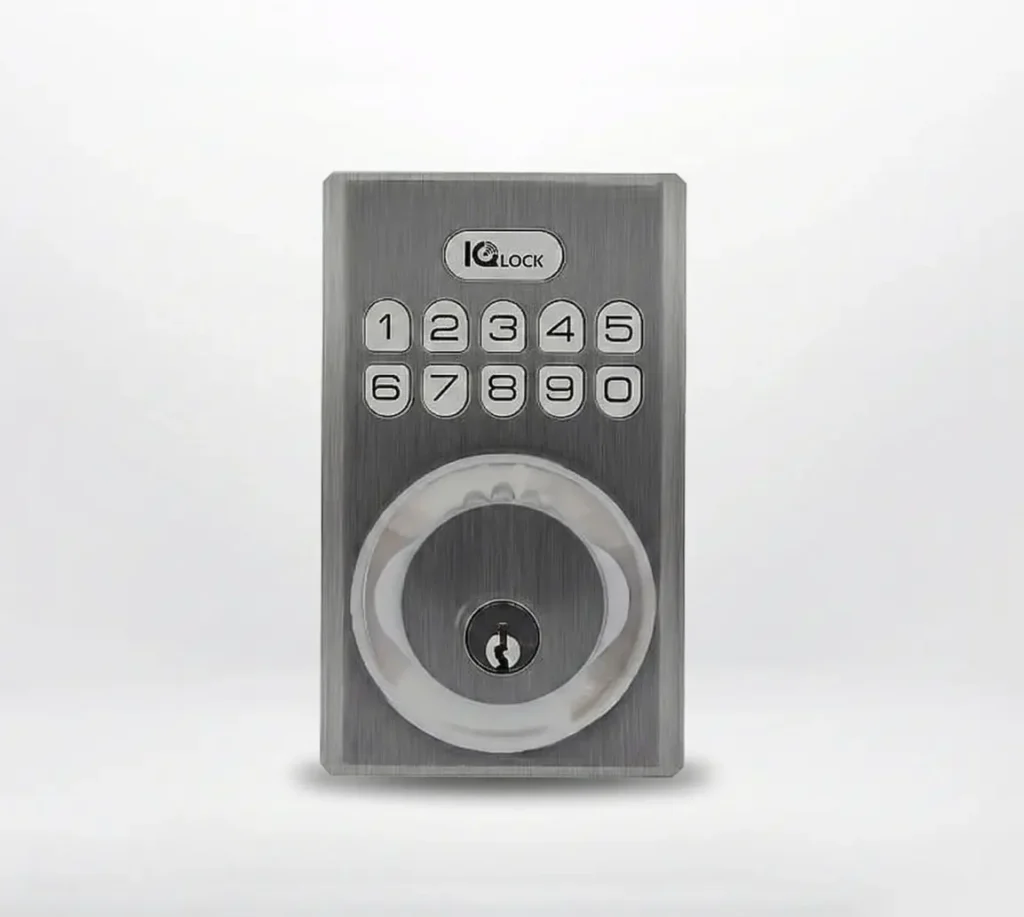
IQ Smart Lock for best front door security

Specs

Bolt Type: Motorized / Standard deadbolt

Backset: 2 3/8” / 2 3/4” Adjustable (60/70mm)

Door Prep: 1 1/2” / 2 1/8” (38/54mm)

Door Thickness: 1 3/8” ~ 2 1/4” (35-58mm) automatic adjustment

Unlocking Method: PowerG wireless communication (via App and Panel), Button keypad, key, thumb-turn

Code Capacity: User code x 250

Code Length: 4-8 digits

Override Key Cylinder: Yes

Cylinder: KW1 keyway

Working Voltage: DC 6V

Battery (Not included): AA x 4

Working Temperature Exterior: -35˚C to 66˚C

Working Temperature Interior: 0˚C to 60˚C

IP Rating: Exterior assembly: IP54

Lockout Mode: (Wrong entry limit) Keypad lockout for 3 minutes after 10 entries of invalid user code

Low Battery Alarm: Yes

Battery Life: Min. 12 months (6 user code unlock events, and 10 unlocking and lock cycles for each day)

Certifications: FCC, IC, ANSI BHMA A156.36 Grade 2, UL10C (20min Fire Rating)

IoT Connection: PowerG

Product Weight: 3.6 LB

Operating Humidity Exterior: 100% condensing

Operating Humidity Interior: 20% – 95% non-condensing

Colours

Documentation

1) Remove battery pack.

2) Dispose of batteries.

3) Install new batteries in the battery pack.

4) Reinstall battery pack.
  1. Log in to the Alarm.com app.
  2. Tap Menu.
  3. Tap Notifications.
  4. Tap Settings.
  5. Tap Add.
  6. Tap System Event.
  7. Enter the desired name for the new notification rule.
  8. In Important, select A device has low battery.
  9. In Recipients, tap Add to add notification recipients.
  10. Tap to select your desired recipients from the Address Book, or add an unlisted recipient by tapping Add Contact.
  11. Tap Close.
  12. Verify the notification is configured with the correct settings.
  13. Tap Save.
  1. Log in to the Alarm.com app.
  2. Tap icn-menu.svg

  3. Tap Notifications.
  4. Tap Settings.
  5. Tap Add.
  6. Tap Lock Activity.
  7. Rename the rule.
  8. In When, tap to select the locks to be notified about. 
  9. In Is, tap to select the lock action to be notified about.
     
    Note: The notification will include the name of the lock that performed the desired action. If unlocked by a user code, the name of the user will also be included. For remote actions, the login name that performed the action on the lock will be included in the notification. 
     
  10. In During this time frame, tap to select when to receive notifications.
    • At All Times will send a notification any time of day if the lock status changes.
    • Only during the following times will specify specific days and times that the notifications will be sent.
  11. To add notification recipients, tap the Add.
  12. Tap to select the desired recipients from the Address Book, or add an unlisted recipient by clicking Add Contact.
  13. Tap Close.
  14. Verify the notification is configured with the correct settings.
  15. Tap Save.
  1. Log in to the Alarm.com app.
  2. Tap Menu.
  3. Tap Notifications.
  4. Tap Settings.
  5. Tap Add.
  6. Tap Lock Left Unlocked.
  7. Enter the desired name for the new notification.
  8. In When any of these locks, tap to select the locks to be notified about.
  9. In Is Left Unlocked, select either of the following:
    • For this duration to select the number of minutes the door must be left open to receive the notification.
    • When select people cross a Geo-Fence to select when specific users enter or exit a location. 
  10. In During this time frame, select either of the following:
    • At All Times will send a notification any time of day if the lock is left unlocked.
    • Only during the following times to select specific days and times that the notifications will be sent.
  11. In Recipients, tap Add to add notification recipients.
  12. Tap to select the desired recipients from the Address Book, or add an unlisted recipient by tapping New.
  13. Tap Close.
  14. Verify the notification is configured with the correct settings.
  15. Tap Save.
  16.  
On the app’s home screen, tap the Lock icon (padlock) to toggle its state between locked and unlocked.
Create “Scenes” (e.g., “Away” or “Sleep”) that lock doors automatically when the security system is armed.
Tap Menu > Add Device > Lock to pair a new smart lock with the system.
  1. Log in to the Alarm.com app. 
  2. Tap Menu
  3. Tap Users.
  4. Tap to select the user to manage lock access.
    • If the user has not yet been created, tap icn-add.svg.
  5. Tap   .
  6. In Access Code, enter the user’s desired code. 
  7. Tap to toggle which devices to grant access to. 
  8. Tap Save. Allow a few minutes for the changes to send to the lock. 
  9. If the user should only have access to the devices during specific times, tap Time to select the user’s access period to the device. Once the desired access period is selected, tap Save.

Help Videos

Using the Lock with Smart Home App

Using the Lock with the Panel

Using the Provided Keys

Using the Lock Keypad

FAQs

Q: How long will the lock operate on a set of batteries?
Based on 10 operations per day, a single, new set of Alkaline batteries will operate the lock for over a year.
For best results, use new non-rechargeable Alkaline batteries only.
When the system is idling, it consumes minimum power (very close to battery shelf life.) With alkaline batteries, the lock should be operable after years of idle.
Check your door alignment. If the deadbolt makes several unsuccessful attempts to lock or unlock the door, it may mean that the door is warped and the latch does not line up correctly with the strike. Operating the lock excessively reduces battery life. Avoid turning on the keypad light unnecessarily.

Refer a Friend or Family Member

When someone you refer joins Grand Alarms, you’ll receive 2 months of free service as a thank-you.

Need More Help?

IQ Smart Lock for best front door security

Specs

Bolt Type: Motorized / Standard deadbolt

Backset: 2 3/8” / 2 3/4” Adjustable (60/70mm)

Door Prep: 1 1/2” / 2 1/8” (38/54mm)

Door Thickness: 1 3/8” ~ 2 1/4” (35-58mm) automatic adjustment

Unlocking Method: PowerG wireless communication (via App and Panel), Button keypad, key, thumb-turn

Code Capacity: User code x 250

Code Length: 4-8 digits

Override Key Cylinder: Yes

Cylinder: KW1 keyway

Working Voltage: DC 6V

Battery (Not included): AA x 4

Working Temperature Exterior: -35˚C to 66˚C

Working Temperature Interior: 0˚C to 60˚C

IP Rating: Exterior assembly: IP54

Lockout Mode: (Wrong entry limit) Keypad lockout for 3 minutes after 10 entries of invalid user code

Low Battery Alarm: Yes

Battery Life: Min. 12 months (6 user code unlock events, and 10 unlocking and lock cycles for each day)

Certifications: FCC, IC, ANSI BHMA A156.36 Grade 2, UL10C (20min Fire Rating)

IoT Connection: PowerG

Product Weight: 3.6 LB

Operating Humidity Exterior: 100% condensing

Operating Humidity Interior: 20% – 95% non-condensing

Available Colours

Documentation

1) Remove battery pack.

2) Dispose of batteries.

3) Install new batteries in the battery pack.

4) Reinstall battery pack.
  1. Log in to the Alarm.com app.
  2. Tap Menu.
  3. Tap Notifications.
  4. Tap Settings.
  5. Tap Add.
  6. Tap System Event.
  7. Enter the desired name for the new notification rule.
  8. In Important, select A device has low battery.
  9. In Recipients, tap Add to add notification recipients.
  10. Tap to select your desired recipients from the Address Book, or add an unlisted recipient by tapping Add Contact.
  11. Tap Close.
  12. Verify the notification is configured with the correct settings.
  13. Tap Save.
  1. Log in to the Alarm.com app.
  2. Tap icn-menu.svg

  3. Tap Notifications.
  4. Tap Settings.
  5. Tap Add.
  6. Tap Lock Activity.
  7. Rename the rule.
  8. In When, tap to select the locks to be notified about. 
  9. In Is, tap to select the lock action to be notified about.
     
    Note: The notification will include the name of the lock that performed the desired action. If unlocked by a user code, the name of the user will also be included. For remote actions, the login name that performed the action on the lock will be included in the notification. 
     
  10. In During this time frame, tap to select when to receive notifications.
    • At All Times will send a notification any time of day if the lock status changes.
    • Only during the following times will specify specific days and times that the notifications will be sent.
  11. To add notification recipients, tap the Add.
  12. Tap to select the desired recipients from the Address Book, or add an unlisted recipient by clicking Add Contact.
  13. Tap Close.
  14. Verify the notification is configured with the correct settings.
  15. Tap Save.
  1. Log in to the Alarm.com app.
  2. Tap Menu.
  3. Tap Notifications.
  4. Tap Settings.
  5. Tap Add.
  6. Tap Lock Left Unlocked.
  7. Enter the desired name for the new notification.
  8. In When any of these locks, tap to select the locks to be notified about.
  9. In Is Left Unlocked, select either of the following:
    • For this duration to select the number of minutes the door must be left open to receive the notification.
    • When select people cross a Geo-Fence to select when specific users enter or exit a location. 
  10. In During this time frame, select either of the following:
    • At All Times will send a notification any time of day if the lock is left unlocked.
    • Only during the following times to select specific days and times that the notifications will be sent.
  11. In Recipients, tap Add to add notification recipients.
  12. Tap to select the desired recipients from the Address Book, or add an unlisted recipient by tapping New.
  13. Tap Close.
  14. Verify the notification is configured with the correct settings.
  15. Tap Save.
  16.  
On the app’s home screen, tap the Lock icon (padlock) to toggle its state between locked and unlocked.
Create “Scenes” (e.g., “Away” or “Sleep”) that lock doors automatically when the security system is armed.
Tap Menu > Add Device > Lock to pair a new smart lock with the system.
  1. Log in to the Alarm.com app. 
  2. Tap Menu
  3. Tap Users.
  4. Tap to select the user to manage lock access.
    • If the user has not yet been created, tap icn-add.svg.
  5. Tap   .
  6. In Access Code, enter the user’s desired code. 
  7. Tap to toggle which devices to grant access to. 
  8. Tap Save. Allow a few minutes for the changes to send to the lock. 
  9. If the user should only have access to the devices during specific times, tap Time to select the user’s access period to the device. Once the desired access period is selected, tap Save.

Help Videos

Using the Lock with Smart Home App

Using the Lock with the Panel

Using the Provided Keys

Using the Lock Keypad

Frequently Asked Questions

Q: How long will the lock operate on a set of batteries?
Based on 10 operations per day, a single, new set of Alkaline batteries will operate the lock for over a year.
For best results, use new non-rechargeable Alkaline batteries only.
When the system is idling, it consumes minimum power (very close to battery shelf life.) With alkaline batteries, the lock should be operable after years of idle.
Check your door alignment. If the deadbolt makes several unsuccessful attempts to lock or unlock the door, it may mean that the door is warped and the latch does not line up correctly with the strike. Operating the lock excessively reduces battery life. Avoid turning on the keypad light unnecessarily.

Request your free quote

Looking for the best security company near you? Fill out this quick form, and one of our local security experts will call you back the same day.

Request your free quote

Looking for the best security company near you? Fill out this quick form, and one of our local security experts will call you back the same day.

Request your free quote

Looking for the best security company near you? Fill out this quick form, and one of our local security experts will call you back the same day.

Request your free quote

Looking for the best security company near you? Fill out this quick form, and one of our local security experts will call you back the same day.

Get A Free Security Quote

Looking for the best home alarm company near you? Fill out this quick form and one of our local security experts will call you back the same day.

Get A Free Security Quote

Looking for the best home alarm company near you? Fill out this quick form and one of our local security experts will call you back the same day.

Get A Free Security Quote

Looking for the best home alarm company near you? Fill out this quick form and one of our local security experts will call you back the same day.

Get A Free Security Quote

Looking for the best home alarm company near you? Fill out this quick form and one of our local security experts will call you back the same day.

Get A Free Security Quote

Looking for the best home alarm company near you? Fill out this quick form and one of our local security experts will call you back the same day.

Get A Free Security Quote

Looking for the best home alarm company near you? Fill out this quick form and one of our local security experts will call you back the same day.

Get A Free Security Quote

Looking for the best home alarm company near you? Fill out this quick form and one of our local security experts will call you back the same day.

Get A Free Security Quote

Looking for the best home alarm company near you? Fill out this quick form and one of our local security experts will call you back the same day.

Request your free quote

Looking for the best home alarm company near you? Fill out this quick form and one of our local security experts will call you back the same day.

Request your free quote

Looking for the best home alarm company near you? Fill out this quick form and one of our local security experts will call you back the same day.

Request your free quote

Looking for the best home alarm company near you? Fill out this quick form and one of our local security experts will call you back the same day.

Request your free quote

Looking for the best home alarm company near you? Fill out this quick form and one of our local security experts will call you back the same day.

Request your free quote

Looking for the best home alarm company near you? Fill out this quick form and one of our local security experts will call you back the same day.

Request your free quote

Looking for the best home alarm company near you? Fill out this quick form and one of our local security experts will call you back the same day.

Request your free quote

Looking for the best home alarm company near you? Fill out this quick form and one of our local security experts will call you back the same day.

Request your free quote

Looking for the best home alarm company near you? Fill out this quick form and one of our local security experts will call you back the same day.

Request your free quote

Looking for the best home alarm company near you? Fill out this quick form and one of our local security experts will call you back the same day.

Request your free quote

Looking for the best home alarm company near you? Fill out this quick form and one of our local security experts will call you back the same day.

Request your free quote

Looking for the best home alarm company near you? Fill out this quick form and one of our local security experts will call you back the same day.

Request your free quote

Looking for the best home alarm company near you? Fill out this quick form and one of our local security experts will call you back the same day.

Request your free quote

Looking for the best home alarm company near you? Fill out this quick form and one of our local security experts will call you back the same day.

Request your free quote

Looking for the best home alarm company near you? Fill out this quick form and one of our local security experts will call you back the same day.

Request your free quote

Looking for the best home alarm company near you? Fill out this quick form and one of our local security experts will call you back the same day.

Request your free quote

Looking for the best home alarm company near you? Fill out this quick form and one of our local security experts will call you back the same day.

Request your free quote

Looking for the best home alarm company near you? Fill out this quick form and one of our local security experts will call you back the same day.

Request your free quote

Looking for the best home alarm company near you? Fill out this quick form and one of our local security experts will call you back the same day.

Request your free quote

Looking for the best home alarm company near you? Fill out this quick form and one of our local security experts will call you back the same day.

Request your free quote

Looking for the best home alarm company near you? Fill out this quick form and one of our local security experts will call you back the same day.

Request your free quote

Looking for the best home alarm company near you? Fill out this quick form and one of our local security experts will call you back the same day.

Request your free quote

Looking for the best home alarm company near you? Fill out this quick form and one of our local security experts will call you back the same day.

Request your free quote

Looking for the best home alarm company near you? Fill out this quick form and one of our local security experts will call you back the same day.

Request your free quote

Looking for the best home alarm company near you? Fill out this quick form and one of our local security experts will call you back the same day.

Request your free quote

Looking for the best home alarm company near you? Fill out this quick form and one of our local security experts will call you back the same day.

Request your free quote

Looking for the best home alarm company near you? Fill out this quick form and one of our local security experts will call you back the same day.

Request your free quote

Looking for the best home alarm company near you? Fill out this quick form and one of our local security experts will call you back the same day.

Request your free quote

Looking for the best home alarm company near you? Fill out this quick form and one of our local security experts will call you back the same day.

Request your free quote

Looking for the best home alarm company near you? Fill out this quick form and one of our local security experts will call you back the same day.

Request your free quote

Looking for the best home alarm company near you? Fill out this quick form and one of our local security experts will call you back the same day.

Request your free quote

Looking for the best home alarm company near you? Fill out this quick form and one of our local security experts will call you back the same day.

Request your free quote

Looking for the best home alarm company near you? Fill out this quick form and one of our local security experts will call you back the same day.

Request your free quote

Looking for the best home alarm company near you? Fill out this quick form and one of our local security experts will call you back the same day.

Request your free quote

Looking for the best home alarm company near you? Fill out this quick form and one of our local security experts will call you back the same day.

Request your free quote

Fill out this quick form and one of our experts will call you back the same day.

Request your free quote

Fill out this quick form and one of our experts will call you back the same day.

Request your free quote

Fill out this quick form and one of our experts will call you back the same day.

Request your free quote

Fill out this quick form and one of our experts will call you back the same day.

Request your free quote

Fill out this quick form and one of our experts will call you back the same day.

Request your free quote

Fill out this quick form and one of our experts will call you back the same day.

Request your free quote

Fill out this quick form and one of our experts will call you back the same day.

Request your free quote

Fill out this quick form and one of our experts will call you back the same day.

Request your free quote

Looking for the best home alarm company near you? Fill out this quick form and one of our local security experts will call you back the same day.

Request your free quote

Looking for the best home alarm company near you? Fill out this quick form and one of our local security experts will call you back the same day.

Get Protected for $0 Upfront

Looking for the best home alarm company near you? Fill out this quick form and one of our local security experts will call you back the same day.

Get Protected for $0 Upfront

Looking for the best home alarm company near you? Fill out this quick form and one of our local security experts will call you back the same day.

Request your free quote

Looking for the best home alarm company near you? Fill out this quick form and one of our local security experts will call you back the same day.

Request your free quote

Looking for the best home alarm company near you? Fill out this quick form and one of our local security experts will call you back the same day.

Request your free quote

Looking for the best home alarm company near you? Fill out this quick form and one of our local security experts will call you back the same day.

Request your free quote

Looking for the best home alarm company near you? Fill out this quick form and one of our local security experts will call you back the same day.

Request your free quote

Looking for the best home alarm company near you? Fill out this quick form and one of our local security experts will call you back the same day.

Request your free quote

Looking for the best home alarm company near you? Fill out this quick form and one of our local security experts will call you back the same day.

Request your free quote

Looking for the best home alarm company near you? Fill out this quick form and one of our local security experts will call you back the same day.

Request your free quote

Looking for the best home alarm company near you? Fill out this quick form and one of our local security experts will call you back the same day.

Request your free quote

Looking for the best home alarm company near you? Fill out this quick form and one of our local security experts will call you back the same day.

Request your free quote

Looking for the best home alarm company near you? Fill out this quick form and one of our local security experts will call you back the same day.

Request your free quote

Looking for the best home alarm company near you? Fill out this quick form and one of our local security experts will call you back the same day.

Request your free quote

Looking for the best home alarm company near you? Fill out this quick form and one of our local security experts will call you back the same day.

Start Securing Your Home Today!

Looking for the best security company near you? Fill out this quick form, and one of our local security experts will call you back the same day.

Start Securing Your Home Today!

Looking for the best security company near you? Fill out this quick form, and one of our local security experts will call you back the same day.

Request your free quote

Looking for the best security company near you? Fill out this quick form, and one of our local security experts will call you back the same day.

Request your free quote

Looking for the best security company near you? Fill out this quick form, and one of our local security experts will call you back the same day.

Request your free quote

Looking for the best security company near you? Fill out this quick form, and one of our local security experts will call you back the same day.

Request your free quote

Looking for the best security company near you? Fill out this quick form, and one of our local security experts will call you back the same day.

Request your free quote

Looking for the best security company near you? Fill out this quick form, and one of our local security experts will call you back the same day.

Request your free quote

Looking for the best security company near you? Fill out this quick form, and one of our local security experts will call you back the same day.

Request your free quote

Looking for the best security company near you? Fill out this quick form, and one of our local security experts will call you back the same day.

Request your free quote

Looking for the best security company near you? Fill out this quick form, and one of our local security experts will call you back the same day.

Request your free quote

Looking for the best home alarm company near you? Fill out this quick form and one of our local security experts will call you back the same day.

Request your free quote

Looking for the best home alarm company near you? Fill out this quick form and one of our local security experts will call you back the same day.

Request your free quote

Looking for the best home alarm company near you? Fill out this quick form and one of our local security experts will call you back the same day.

Request your free quote

Looking for the best home alarm company near you? Fill out this quick form and one of our local security experts will call you back the same day.

Request your free quote

Looking for the best home alarm company near you? Fill out this quick form and one of our local security experts will call you back the same day.

Request your free quote

Looking for the best home alarm company near you? Fill out this quick form and one of our local security experts will call you back the same day.

Request your free quote

Looking for the best home alarm company near you? Fill out this quick form and one of our local security experts will call you back the same day.

Request your free quote

Looking for the best home alarm company near you? Fill out this quick form and one of our local security experts will call you back the same day.

Request your free quote

Looking for the best home alarm company near you? Fill out this quick form and one of our local security experts will call you back the same day.

Request your free quote

Looking for the best home alarm company near you? Fill out this quick form and one of our local security experts will call you back the same day.

Request your free quote

Looking for the best home alarm company near you? Fill out this quick form and one of our local security experts will call you back the same day.

Request your free quote

Looking for the best home alarm company near you? Fill out this quick form and one of our local security experts will call you back the same day.

Request your free quote

Looking for the best home alarm company near you? Fill out this quick form and one of our local security experts will call you back the same day.

Request your free quote

Looking for the best home alarm company near you? Fill out this quick form and one of our local security experts will call you back the same day.

Request your free quote

Looking for the best home alarm company near you? Fill out this quick form and one of our local security experts will call you back the same day.

Request your free quote

Looking for the best home alarm company near you? Fill out this quick form and one of our local security experts will call you back the same day.