
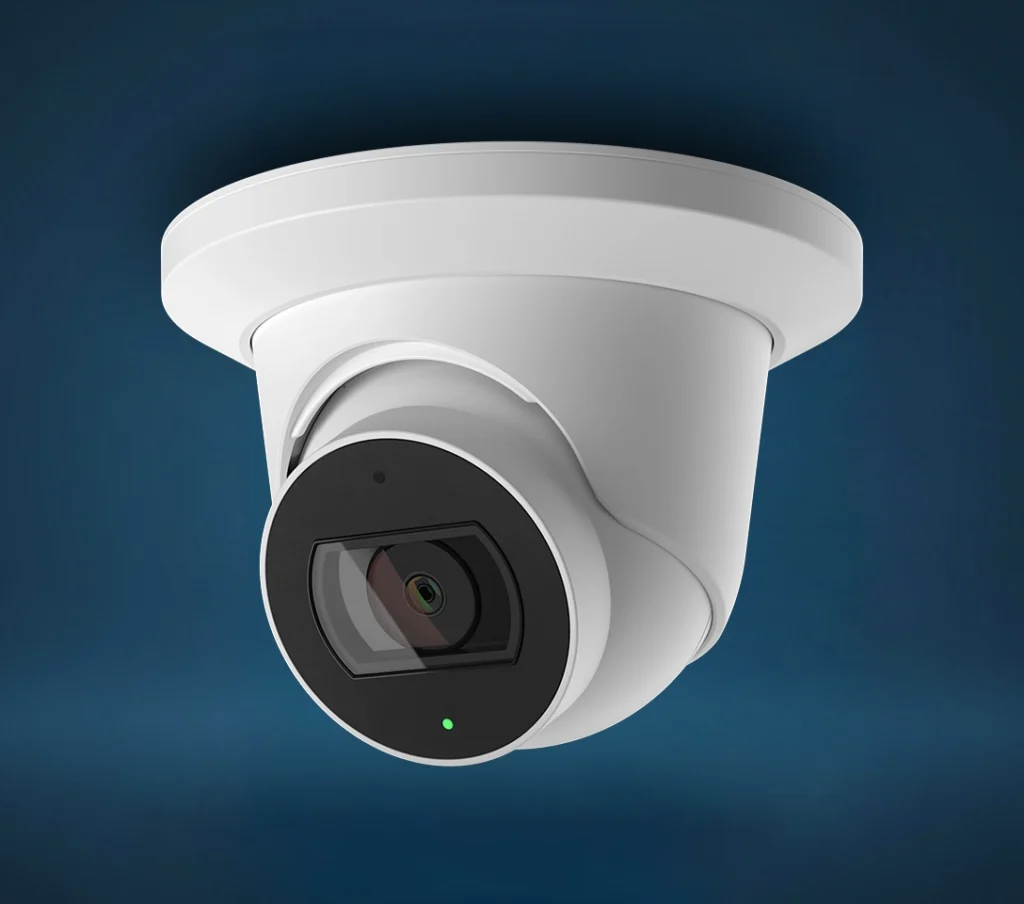
Specs
Model: ADC-VC838PF
Camera Type: Varifocal turret camera
Use: Indoor / outdoor
Connection: Wired Ethernet, no Wi-Fi
Power: PoE IEEE 802.3af or 12VDC
Resolution: Up to 2688 x 1520
Live View: 1920 x 1080
Lens: 3.2 mm to 9.8 mm varifocal
Field of View: 116° to 34°
Night Vision: Up to 95 ft / 30 m
Weather Rating: IP66
Audio: Built-in microphone and speaker
Ethernet: 10/100 Mbps RJ-45
Power Input: PoE+
Local Storage: microSD card support up to 1TB
Weather Rating: IP66
Operating Temperature: -30°C to 50°C / -22°F to 122°F
Dimensions: 13.8 cm x 9.7 cm / 5.4” x 3.8”
Weight: 376.5 g / 13.3 oz
Audio: No two-way audio
Storage: SVR and onboard recording compatible
Kit Contents
Common kits include the valve plus compatible flood sensors
Documentation
Data Sheet
Installation Guide
Factory Reset to Its Default Settings
What do the LEDs on the ADC-VC838PF mean:
LED pattern
Description
Not illuminated 
Power off
Solid Green 
Connected to Alarm.com
Blinking Green 
Local Network Connection
Blinking Green and Red 
Reverting to factory default settings
Blinking Red 
Power on, camera booting
Solid Red 
No local or Internet connection
Frequently Asked Questions
How do I view my ProSeries Camera from the Alarm.com app?
Open the Alarm.com app and tap the Video section. From there, select your ProSeries Camera to view live video, saved clips, and available camera settings. If the camera does not appear in the app, it may not be enrolled to your account yet or it may be offline.
Does the ProSeries Camera use Wi-Fi?
No. The ProSeries Camera is a wired PoE camera, which means it uses an Ethernet cable for the network connection and power. It does not connect directly to Wi-Fi. This gives the camera a more stable connection than a wireless camera, but it does require a proper Ethernet cable connection.
What does PoE mean?
PoE stands for Power over Ethernet. This means one Ethernet cable can provide both internet connection and power to the camera. If the camera is not turning on, the issue may be with the Ethernet cable, PoE switch, PoE injector, router, or network connection.
Why is my ProSeries Camera offline?
The camera may be offline if it has lost power, the Ethernet cable is loose, the PoE switch or injector is not working, or the internet connection is down. Check that the cable is firmly connected, confirm the network equipment has power, and make sure your internet is working. If everything looks normal, restart the camera and network equipment.
How do I restart my ProSeries Camera?
To restart the camera, disconnect its power source, wait about 30 seconds, and reconnect it. For a PoE camera, this usually means unplugging the Ethernet cable from the PoE switch, PoE injector, or camera connection point, then plugging it back in. Give the camera a few minutes to reconnect.
Can I use the ProSeries Camera outside?
Yes. The ProSeries Camera is designed for indoor or outdoor use. It should still be mounted properly, sealed correctly, and installed in a location where water cannot enter the cable connection. Poor cable sealing is where outdoor installs usually go to die quietly.
How do I adjust the zoom on my ProSeries Camera?
The ProSeries Camera has a motorized varifocal lens, which allows the viewing angle to be adjusted remotely through supported Alarm.com camera settings. The view can be widened to see more of an area or narrowed to focus on a specific entrance, driveway, gate, or business area.
What is a varifocal lens?
A varifocal lens allows the camera’s viewing angle to be adjusted after installation. Instead of being stuck with one fixed view, the camera can be set wider for general coverage or tighter for a more focused view. This is especially useful for driveways, storefronts, gates, loading areas, and long side yards.
Why does my camera image look blurry?
A blurry image may be caused by dirt on the lens, moisture, glare, incorrect focus, or the camera being zoomed too far for the scene. Clean the lens gently with a soft microfiber cloth. If the view is still blurry, the focus settings may need to be adjusted.
Can the ProSeries Camera see at night?
Yes. The ProSeries Camera has infrared night vision, allowing it to capture video in low-light and dark conditions. Night vision performance depends on the installation location, nearby walls, reflective surfaces, weather, and how far the subject is from the camera.
Why does my night vision look washed out or too bright?
Night vision can look washed out if the camera is pointed at a nearby wall, soffit, fence, post, or reflective surface. The infrared light bounces back into the lens and overexposes the image. Adjusting the camera angle usually fixes the issue.
Why is part of my night image dark?
The infrared light may not be reaching that part of the scene, or the camera may be aimed too wide for the area you want covered. The camera angle, zoom level, nearby lighting, and reflective surfaces can all affect nighttime image quality.
Can I rotate or flip the camera image?
Yes, image orientation settings may be available through the Alarm.com video settings. This can help if the camera was mounted in a position where the image appears upside down or needs adjustment. If you do not see this option, contact support to review the camera settings on your account.
How do I change motion detection settings?
Motion detection settings are managed through the Alarm.com app or website. You can adjust recording rules, alert zones, sensitivity, and notification settings depending on the features enabled on your account. For best results, focus motion detection on important areas like doors, driveways, gates, counters, or walkways.
Why am I getting too many camera alerts?
Too many alerts usually means the camera is detecting motion from trees, cars, shadows, headlights, rain, snow, or busy sidewalks. Adjust the motion zones so the camera watches the important area and ignores unnecessary movement. Reducing sensitivity may also help.
Why am I not getting camera alerts?
You may not receive alerts if notifications are turned off, recording rules are not set up, the camera is offline, the motion zone is too small, or the sensitivity is too low. Also check your phone’s notification settings to make sure Alarm.com notifications are allowed.
Can the ProSeries Camera detect people or vehicles?
The ProSeries Camera supports advanced video analytics when enabled through Alarm.com. Depending on your service plan and settings, it may help identify people, vehicles, and activity in selected areas. This can reduce unnecessary alerts compared to basic motion detection.
Does the ProSeries Camera record all the time?
Recording depends on your Alarm.com video plan and setup. The camera may record motion-triggered clips, analytics-triggered clips, continuous recording through a compatible Stream Video Recorder, or local onboard recording if supported and configured. Not every account has every recording option enabled.
Can I save video clips from the ProSeries Camera?
Yes. Saved clips can usually be viewed and downloaded through the Alarm.com app or website, depending on your video plan and storage settings. If a clip is important, save it as soon as possible so it is not overwritten or deleted based on your account’s storage limits.
How do I factory reset the ProSeries Camera?
The reset button is located under the sealed access door near the SD card slot. Press and hold the reset button until the LED flashes green and red, which takes about 15 seconds, then release it. The camera will reboot with factory default settings. If the camera was already connected to an Alarm.com account, it may need to be removed from that account before it can be added again.
Refer a Friend or Family Member
When someone you refer joins Grand Alarms, you’ll receive 2 months of free service as a thank-you.
Specs
Model: ADC-VC838PF
Camera Type: Varifocal turret camera
Use: Indoor / outdoor
Connection: Wired Ethernet, no Wi-Fi
Power: PoE IEEE 802.3af or 12VDC
Resolution: Up to 2688 x 1520
Live View: 1920 x 1080
Lens: 3.2 mm to 9.8 mm varifocal
Field of View: 116° to 34°
Night Vision: Up to 95 ft / 30 m
Weather Rating: IP66
Audio: Built-in microphone and speaker
Ethernet: 10/100 Mbps RJ-45
Power Input: PoE+
Local Storage: microSD card support up to 1TB
Weather Rating: IP66
Operating Temperature: -30°C to 50°C / -22°F to 122°F
Dimensions: 13.8 cm x 9.7 cm / 5.4” x 3.8”
Weight: 376.5 g / 13.3 oz
Audio: No two-way audio
Storage: SVR and onboard recording compatible
Kit Contents
Common kits include the valve plus compatible flood sensors
Documentation
Data Sheet
Installation Guide
Factory Reset to Its Default Settings
What do the LEDs on the ADC-VC838PF mean:
LED reference
LED pattern
LED pattern
Description
Not illuminated
Power off
Solid Green
Connected to Alarm.com
Blinking Green
Local Network Connection
Blinking Green and Red
Reverting to factory default settings
Blinking Red
Power on, camera booting
Solid Red
No local or Internet connection
Frequently Asked Questions
How do I view my ProSeries Camera from the Alarm.com app?
Open the Alarm.com app and tap the Video section. From there, select your ProSeries Camera to view live video, saved clips, and available camera settings. If the camera does not appear in the app, it may not be enrolled to your account yet or it may be offline.
Does the ProSeries Camera use Wi-Fi?
No. The ProSeries Camera is a wired PoE camera, which means it uses an Ethernet cable for the network connection and power. It does not connect directly to Wi-Fi. This gives the camera a more stable connection than a wireless camera, but it does require a proper Ethernet cable connection.
What does PoE mean?
PoE stands for Power over Ethernet. This means one Ethernet cable can provide both internet connection and power to the camera. If the camera is not turning on, the issue may be with the Ethernet cable, PoE switch, PoE injector, router, or network connection.
Why is my ProSeries Camera offline?
The camera may be offline if it has lost power, the Ethernet cable is loose, the PoE switch or injector is not working, or the internet connection is down. Check that the cable is firmly connected, confirm the network equipment has power, and make sure your internet is working. If everything looks normal, restart the camera and network equipment.
How do I restart my ProSeries Camera?
To restart the camera, disconnect its power source, wait about 30 seconds, and reconnect it. For a PoE camera, this usually means unplugging the Ethernet cable from the PoE switch, PoE injector, or camera connection point, then plugging it back in. Give the camera a few minutes to reconnect.
Can I use the ProSeries Camera outside?
Yes. The ProSeries Camera is designed for indoor or outdoor use. It should still be mounted properly, sealed correctly, and installed in a location where water cannot enter the cable connection. Poor cable sealing is where outdoor installs usually go to die quietly.
How do I adjust the zoom on my ProSeries Camera?
The ProSeries Camera has a motorized varifocal lens, which allows the viewing angle to be adjusted remotely through supported Alarm.com camera settings. The view can be widened to see more of an area or narrowed to focus on a specific entrance, driveway, gate, or business area.
What is a varifocal lens?
A varifocal lens allows the camera’s viewing angle to be adjusted after installation. Instead of being stuck with one fixed view, the camera can be set wider for general coverage or tighter for a more focused view. This is especially useful for driveways, storefronts, gates, loading areas, and long side yards.
Why does my camera image look blurry?
A blurry image may be caused by dirt on the lens, moisture, glare, incorrect focus, or the camera being zoomed too far for the scene. Clean the lens gently with a soft microfiber cloth. If the view is still blurry, the focus settings may need to be adjusted.
Can the ProSeries Camera see at night?
Yes. The ProSeries Camera has infrared night vision, allowing it to capture video in low-light and dark conditions. Night vision performance depends on the installation location, nearby walls, reflective surfaces, weather, and how far the subject is from the camera.
Why does my night vision look washed out or too bright?
Night vision can look washed out if the camera is pointed at a nearby wall, soffit, fence, post, or reflective surface. The infrared light bounces back into the lens and overexposes the image. Adjusting the camera angle usually fixes the issue.
Why is part of my night image dark?
The infrared light may not be reaching that part of the scene, or the camera may be aimed too wide for the area you want covered. The camera angle, zoom level, nearby lighting, and reflective surfaces can all affect nighttime image quality.
Can I rotate or flip the camera image?
Yes, image orientation settings may be available through the Alarm.com video settings. This can help if the camera was mounted in a position where the image appears upside down or needs adjustment. If you do not see this option, contact support to review the camera settings on your account.
How do I change motion detection settings?
Motion detection settings are managed through the Alarm.com app or website. You can adjust recording rules, alert zones, sensitivity, and notification settings depending on the features enabled on your account. For best results, focus motion detection on important areas like doors, driveways, gates, counters, or walkways.
Why am I getting too many camera alerts?
Too many alerts usually means the camera is detecting motion from trees, cars, shadows, headlights, rain, snow, or busy sidewalks. Adjust the motion zones so the camera watches the important area and ignores unnecessary movement. Reducing sensitivity may also help.
Why am I not getting camera alerts?
You may not receive alerts if notifications are turned off, recording rules are not set up, the camera is offline, the motion zone is too small, or the sensitivity is too low. Also check your phone’s notification settings to make sure Alarm.com notifications are allowed.
Can the ProSeries Camera detect people or vehicles?
The ProSeries Camera supports advanced video analytics when enabled through Alarm.com. Depending on your service plan and settings, it may help identify people, vehicles, and activity in selected areas. This can reduce unnecessary alerts compared to basic motion detection.
Does the ProSeries Camera record all the time?
Recording depends on your Alarm.com video plan and setup. The camera may record motion-triggered clips, analytics-triggered clips, continuous recording through a compatible Stream Video Recorder, or local onboard recording if supported and configured. Not every account has every recording option enabled.
Can I save video clips from the ProSeries Camera?
Yes. Saved clips can usually be viewed and downloaded through the Alarm.com app or website, depending on your video plan and storage settings. If a clip is important, save it as soon as possible so it is not overwritten or deleted based on your account’s storage limits.
How do I factory reset the ProSeries Camera?
The reset button is located under the sealed access door near the SD card slot. Press and hold the reset button until the LED flashes green and red, which takes about 15 seconds, then release it. The camera will reboot with factory default settings. If the camera was already connected to an Alarm.com account, it may need to be removed from that account before it can be added again.