
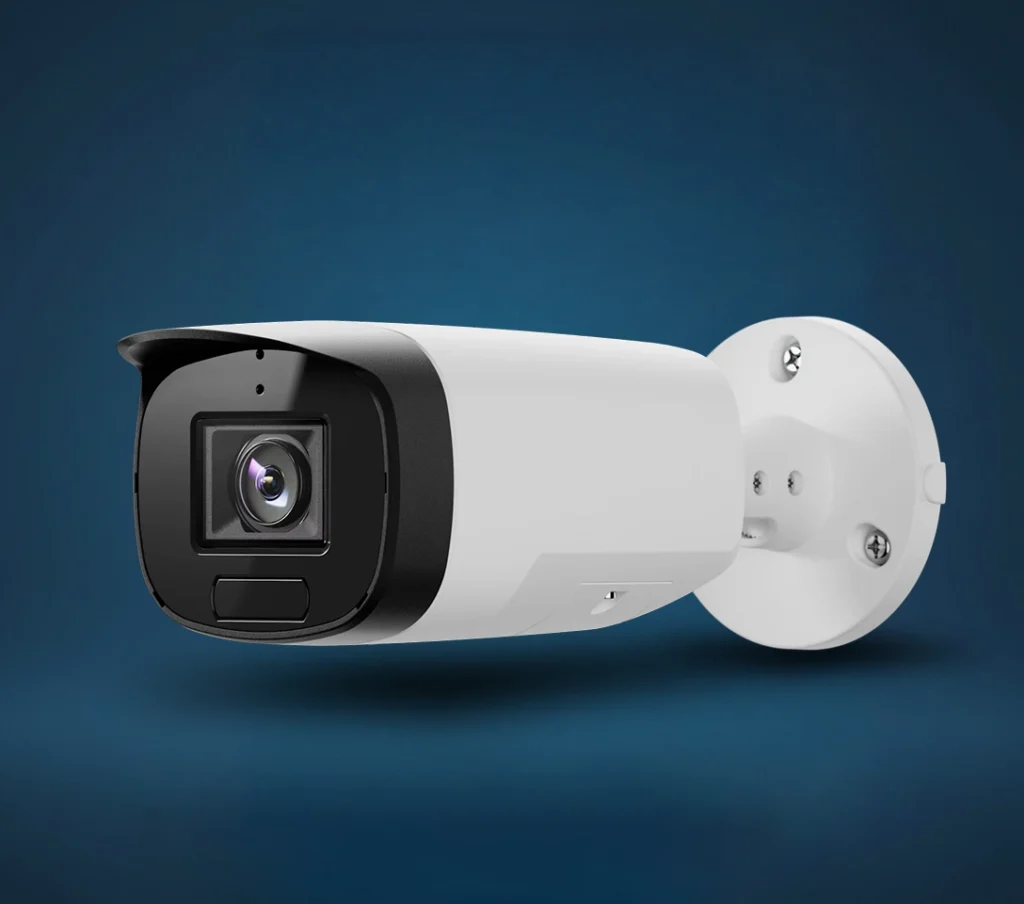
Specs
Model: ADC-VC7398PA
Max Resolution: 3840 × 2160, 8MP
Image Sensor: 1/1.8” Sony STARVIS 2 CMOS
Field of View: Horizontal: 110.4° to 45.1°
Night Vision: Built-in IR, up to 40 m range
Power: IEEE 802.3af PoE
Operating Temperature: -35°C to 60°C with IR off / -35°C to 50°C with IR on
Protection Rating: IP66, IP67, IK10, NEMA 4X
Colours
White
Documentation
Frequently Asked Questions
Why is my Prism Series Bullet Camera offline?
First, check that the camera has power through its PoE switch or injector. This camera does not use a regular power plug, so if the PoE switch, injector, Ethernet cable, or network connection is down, the camera may go offline. If the LED is solid red, the camera has no local or internet connection. Power cycle the camera and check the Ethernet connection before booking service.
What do the LED colours mean?
Not illuminated means the camera is powered off. Solid green means it is connected. Blinking green means it has a local network connection. Solid red means there is no local or internet connection. Blinking red means the camera is booting. Blinking yellow means it is power cycling. Blinking green and red means it is reverting to factory defaults.
How do I power cycle the camera?
Power cycling means temporarily removing power and reconnecting it. Since this is a PoE camera, disconnect the Ethernet cable from the PoE switch or injector, wait about 10 seconds, then reconnect it. Allow the camera up to 2 minutes to boot and reconnect. A solid green LED means the camera is connected again.
Why is my camera not showing in the Grand Alarms Smart Home App?
The camera may be offline, still booting, or not properly connected to the network. Check the LED first. If the camera is solid green but still does not show properly in the Grand Alarms Smart Home App, close and reopen the app. If the issue continues, the camera may need to be checked on the account or re-enrolled.
Can I add the camera myself in the Grand Alarms Smart Home App?
In some cases, yes. In the app, go to Add Device, then choose Video Camera, then select VC7398PA and follow the on-screen steps. If you do not see the Add Device option, your account settings may require technician support.
Why does the camera need an Ethernet cable?
The Prism Series Bullet Camera is a PoE camera. That means one Ethernet cable provides both power and network connection. It does not connect over Wi-Fi. This setup is more stable for business locations, but it also means the camera depends on the Ethernet cable, PoE switch or injector, and internet connection being active.
Why is the video blurry or unclear?
Check whether the protective plastic lens cover was removed after installation. If the cover is still on, the image will look unclear. Also check for dirt, water spots, condensation, or physical obstruction on the lens. If the image is still poor after cleaning the camera face, the camera angle, focus, or installation position may need adjustment.
Why is my night video black and white instead of colour?
The camera supports low-light colour performance, but lighting conditions still matter. In very dark areas, the camera may rely on IR night vision, which can appear black and white. This is normal. Adding site lighting or adjusting the camera placement may improve colour visibility at night.
How far can the camera see at night?
The built-in IR night vision range is up to 40 metres. Real-world results can vary based on lighting, weather, camera angle, reflective surfaces, and how open the area is. Fog, rain, snow, dirty lenses, and awkward mounting angles can all make night footage look worse because physics remains deeply inconsiderate.
Why is two-way audio not working?
The camera has a built-in microphone, but it does not include a built-in speaker. An external analog speaker is required for two-way audio output. Audio settings also need to be enabled in the Grand Alarms Smart Home App or website. If the Audio Input/Output toggle is off, two-way audio and audio recording features may be disabled.
How do I turn audio on or off?
In the Grand Alarms Smart Home App, select the camera, go to Audio, then use the Audio Input/Output setting. You can enable or disable audio input and output, choose the built-in microphone or line-in audio, and adjust line-in gain where applicable. Turning this setting off can disable audio-related features.
Does the camera record audio?
It can support audio when audio input is enabled and the account settings allow it. The camera includes a built-in microphone and line-level input/output. If audio is disabled in the app or website settings, audio will not be included in recordings where applicable.
What should I do if the camera will not enroll?
Make sure the camera is connected to a PoE switch or injector and wait about 2 minutes for it to boot. The LED should turn solid green when connected. If the camera still will not enroll, power cycle it and try again. If it was previously connected to another account, it must be removed from that account before it can be added again.
How do I factory reset the camera?
Press and hold the reset button for 12 to 15 seconds until the LED flashes green and red, then release it. This will revert the camera to factory default settings. Do not do this casually. A reset can remove existing configuration and may require the camera to be added again.
Why does the camera keep disconnecting?
Common causes include a loose Ethernet cable, failing PoE switch or injector, network issues, damaged cable, water getting into a connector, or unstable internet at the business. For outdoor installations, connectors and cable glands must be sealed properly to prevent water ingress. If it disconnects repeatedly, the wiring should be inspected.
Can the camera handle Canadian weather?
Yes, it is built for outdoor commercial use. It is rated IP66, IP67, IK10, and NEMA 4X, with operating temperatures down to -35°C. It can operate up to 60°C with IR off, or up to 50°C with IR on. That said, the cable seals and installation quality still matter. A rugged camera with a bad cable seal is just an expensive future service call.
Can I move the camera to another location myself?
You should not move it unless you are comfortable with PoE cabling, weather sealing, mounting torque, camera aiming, and network reconnection. For outdoor or wet environments, the cable gland and weather seals need to be properly assembled to avoid water ingress. Poor relocation can cause connection issues, water damage, or bad video angles.
Why does my camera view not cover the area I expected?
This camera has a motorized varifocal lens, which means the view can be adjusted between wider and narrower coverage. If the view is too wide, too tight, or aimed at the wrong area, the camera may need to be adjusted or reconfigured. This is a placement and setup issue, not necessarily a camera failure.
Does the camera have local storage?
The camera includes a micro SD card slot. Whether local recording is active depends on the setup, card installation, account configuration, and service plan. For most customers, footage access is handled through the Grand Alarms Smart Home App and the configured video service.
When should I contact Grand Alarms for service?
Contact Grand Alarms if the camera stays offline after power cycling, shows a solid red LED, has water inside the housing or connectors, repeatedly disconnects, has poor video after cleaning the lens, will not enroll, or needs to be moved or re-aimed. Basically, once you have checked power, cable, internet, and the app, stop wrestling with it and call in someone with fewer screwdrivers missing.
Refer a Friend or Family Member
When someone you refer joins Grand Alarms, you’ll receive 2 months of free service as a thank-you.
Specs
Model: ADC-VC7398PA
Max Resolution: 3840 × 2160, 8MP
Image Sensor: 1/1.8” Sony STARVIS 2 CMOS
Field of View: Horizontal: 110.4° to 45.1°
Night Vision: Built-in IR, up to 40 m range
Power: IEEE 802.3af PoE
Operating Temperature: -35°C to 60°C with IR off / -35°C to 50°C with IR on
Protection Rating: IP66, IP67, IK10, NEMA 4X
Available Colours
White
Documentation
Frequently Asked Questions
Why is my Prism Series Bullet Camera offline?
First, check that the camera has power through its PoE switch or injector. This camera does not use a regular power plug, so if the PoE switch, injector, Ethernet cable, or network connection is down, the camera may go offline. If the LED is solid red, the camera has no local or internet connection. Power cycle the camera and check the Ethernet connection before booking service.
What do the LED colours mean?
Not illuminated means the camera is powered off. Solid green means it is connected. Blinking green means it has a local network connection. Solid red means there is no local or internet connection. Blinking red means the camera is booting. Blinking yellow means it is power cycling. Blinking green and red means it is reverting to factory defaults.
How do I power cycle the camera?
Power cycling means temporarily removing power and reconnecting it. Since this is a PoE camera, disconnect the Ethernet cable from the PoE switch or injector, wait about 10 seconds, then reconnect it. Allow the camera up to 2 minutes to boot and reconnect. A solid green LED means the camera is connected again.
Why is my camera not showing in the Grand Alarms Smart Home App?
The camera may be offline, still booting, or not properly connected to the network. Check the LED first. If the camera is solid green but still does not show properly in the Grand Alarms Smart Home App, close and reopen the app. If the issue continues, the camera may need to be checked on the account or re-enrolled.
Can I add the camera myself in the Grand Alarms Smart Home App?
In some cases, yes. In the app, go to Add Device, then choose Video Camera, then select VC7398PA and follow the on-screen steps. If you do not see the Add Device option, your account settings may require technician support.
Why does the camera need an Ethernet cable?
The Prism Series Bullet Camera is a PoE camera. That means one Ethernet cable provides both power and network connection. It does not connect over Wi-Fi. This setup is more stable for business locations, but it also means the camera depends on the Ethernet cable, PoE switch or injector, and internet connection being active.
Why is the video blurry or unclear?
Check whether the protective plastic lens cover was removed after installation. If the cover is still on, the image will look unclear. Also check for dirt, water spots, condensation, or physical obstruction on the lens. If the image is still poor after cleaning the camera face, the camera angle, focus, or installation position may need adjustment.
Why is my night video black and white instead of colour?
The camera supports low-light colour performance, but lighting conditions still matter. In very dark areas, the camera may rely on IR night vision, which can appear black and white. This is normal. Adding site lighting or adjusting the camera placement may improve colour visibility at night.
How far can the camera see at night?
The built-in IR night vision range is up to 40 metres. Real-world results can vary based on lighting, weather, camera angle, reflective surfaces, and how open the area is. Fog, rain, snow, dirty lenses, and awkward mounting angles can all make night footage look worse because physics remains deeply inconsiderate.
Why is two-way audio not working?
The camera has a built-in microphone, but it does not include a built-in speaker. An external analog speaker is required for two-way audio output. Audio settings also need to be enabled in the Grand Alarms Smart Home App or website. If the Audio Input/Output toggle is off, two-way audio and audio recording features may be disabled.
How do I turn audio on or off?
In the Grand Alarms Smart Home App, select the camera, go to Audio, then use the Audio Input/Output setting. You can enable or disable audio input and output, choose the built-in microphone or line-in audio, and adjust line-in gain where applicable. Turning this setting off can disable audio-related features.
Does the camera record audio?
It can support audio when audio input is enabled and the account settings allow it. The camera includes a built-in microphone and line-level input/output. If audio is disabled in the app or website settings, audio will not be included in recordings where applicable.
What should I do if the camera will not enroll?
Make sure the camera is connected to a PoE switch or injector and wait about 2 minutes for it to boot. The LED should turn solid green when connected. If the camera still will not enroll, power cycle it and try again. If it was previously connected to another account, it must be removed from that account before it can be added again.
How do I factory reset the camera?
Press and hold the reset button for 12 to 15 seconds until the LED flashes green and red, then release it. This will revert the camera to factory default settings. Do not do this casually. A reset can remove existing configuration and may require the camera to be added again.
Why does the camera keep disconnecting?
Common causes include a loose Ethernet cable, failing PoE switch or injector, network issues, damaged cable, water getting into a connector, or unstable internet at the business. For outdoor installations, connectors and cable glands must be sealed properly to prevent water ingress. If it disconnects repeatedly, the wiring should be inspected.
Can the camera handle Canadian weather?
Yes, it is built for outdoor commercial use. It is rated IP66, IP67, IK10, and NEMA 4X, with operating temperatures down to -35°C. It can operate up to 60°C with IR off, or up to 50°C with IR on. That said, the cable seals and installation quality still matter. A rugged camera with a bad cable seal is just an expensive future service call.
Can I move the camera to another location myself?
You should not move it unless you are comfortable with PoE cabling, weather sealing, mounting torque, camera aiming, and network reconnection. For outdoor or wet environments, the cable gland and weather seals need to be properly assembled to avoid water ingress. Poor relocation can cause connection issues, water damage, or bad video angles.
Why does my camera view not cover the area I expected?
This camera has a motorized varifocal lens, which means the view can be adjusted between wider and narrower coverage. If the view is too wide, too tight, or aimed at the wrong area, the camera may need to be adjusted or reconfigured. This is a placement and setup issue, not necessarily a camera failure.
Does the camera have local storage?
The camera includes a micro SD card slot. Whether local recording is active depends on the setup, card installation, account configuration, and service plan. For most customers, footage access is handled through the Grand Alarms Smart Home App and the configured video service.
When should I contact Grand Alarms for service?
Contact Grand Alarms if the camera stays offline after power cycling, shows a solid red LED, has water inside the housing or connectors, repeatedly disconnects, has poor video after cleaning the lens, will not enroll, or needs to be moved or re-aimed. Basically, once you have checked power, cable, internet, and the app, stop wrestling with it and call in someone with fewer screwdrivers missing.