
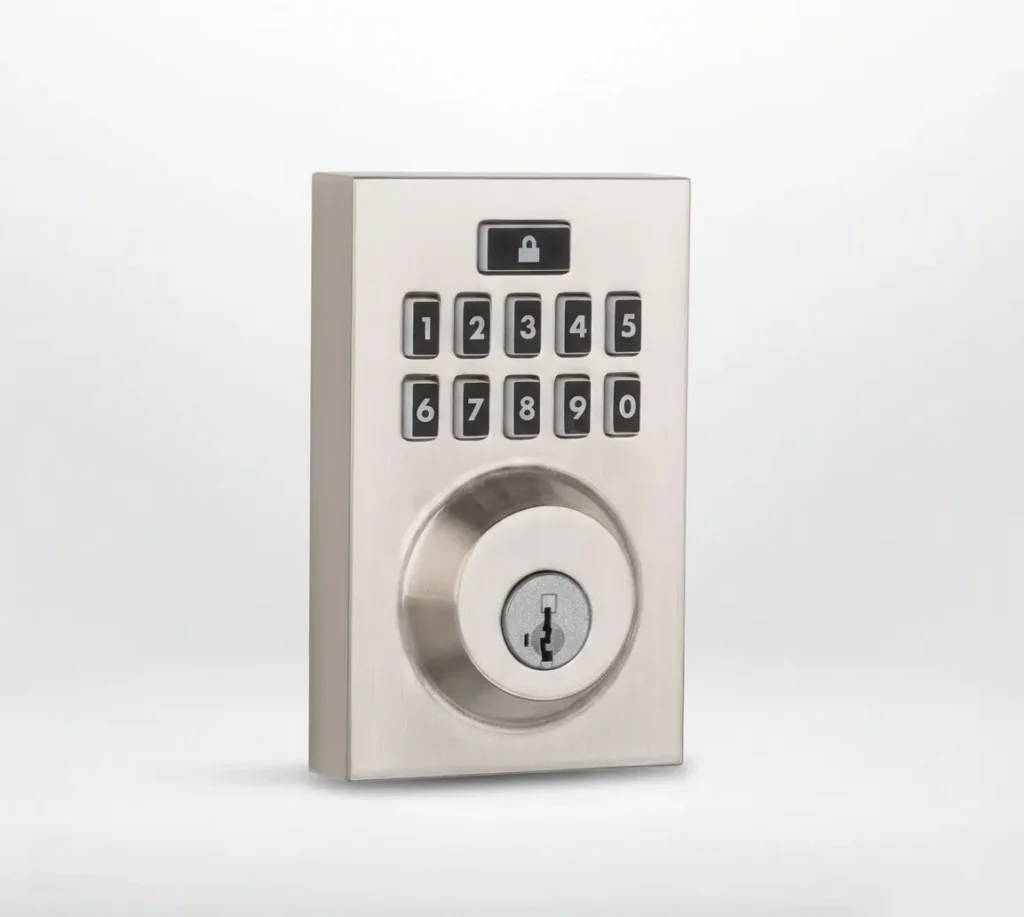
Contemporary Smart lock for smart door locking capabilities

Specs

  • Product Type: Deadbolt

    Style: Contemporary

    Entry Has Smart Key: Yes

    Min Door Thickness: 1-3/8 inches

    Max Door Thickness: 2 inches

    Backset Size: Adjustable

    Cross Bore: 2-1/8 inches

    ADA Compliant: No

Colours

Documentation

1) Remove battery pack.

2) Dispose of batteries.

3) Install new batteries in the battery pack.

4) Reinstall battery pack.
Blinking green: Unlocked

Blinking green and red: Unlocked, Low Battery

Blinking amber: Locked

Blinking amber and red: Locked, Low Battery

Blinking red (even when switch #1 is off): Low Battery
  1. Log in to the Alarm.com app.
  2. Tap Menu.
  3. Tap Notifications.
  4. Tap Settings.
  5. Tap Add.
  6. Tap System Event.
  7. Enter the desired name for the new notification rule.
  8. In Important, select A device has low battery.
  9. In Recipients, tap Add to add notification recipients.
  10. Tap to select your desired recipients from the Address Book, or add an unlisted recipient by tapping Add Contact.
  11. Tap Close.
  12. Verify the notification is configured with the correct settings.
  13. Tap Save.
  1. Log in to the Alarm.com app.
  2. Tap icn-menu.svg

  3. Tap Notifications.
  4. Tap Settings.
  5. Tap Add.
  6. Tap Lock Activity.
  7. Rename the rule.
  8. In When, tap to select the locks to be notified about. 
  9. In Is, tap to select the lock action to be notified about.
     
    Note: The notification will include the name of the lock that performed the desired action. If unlocked by a user code, the name of the user will also be included. For remote actions, the login name that performed the action on the lock will be included in the notification. 
     
  10. In During this time frame, tap to select when to receive notifications.
    • At All Times will send a notification any time of day if the lock status changes.
    • Only during the following times will specify specific days and times that the notifications will be sent.
  11. To add notification recipients, tap the Add.
  12. Tap to select the desired recipients from the Address Book, or add an unlisted recipient by clicking Add Contact.
  13. Tap Close.
  14. Verify the notification is configured with the correct settings.
  15. Tap Save.
  1. Log in to the Alarm.com app.
  2. Tap Menu.
  3. Tap Notifications.
  4. Tap Settings.
  5. Tap Add.
  6. Tap Lock Left Unlocked.
  7. Enter the desired name for the new notification.
  8. In When any of these locks, tap to select the locks to be notified about.
  9. In Is Left Unlocked, select either of the following:
    • For this duration to select the number of minutes the door must be left open to receive the notification.
    • When select people cross a Geo-Fence to select when specific users enter or exit a location. 
  10. In During this time frame, select either of the following:
    • At All Times will send a notification any time of day if the lock is left unlocked.
    • Only during the following times to select specific days and times that the notifications will be sent.
  11. In Recipients, tap Add to add notification recipients.
  12. Tap to select the desired recipients from the Address Book, or add an unlisted recipient by tapping New.
  13. Tap Close.
  14. Verify the notification is configured with the correct settings.
  15. Tap Save.
  16.  
On the app’s home screen, tap the Lock icon (padlock) to toggle its state between locked and unlocked.
Create “Scenes” (e.g., “Away” or “Sleep”) that lock doors automatically when the security system is armed.
If you wish to restore your SmartCode lock to factory default settings and delete all codes associated with it, perform the following procedure.

Note: Once the lock is reset, it may need to be re-included in your control system. Perform the Inclusion process again to add the lock back into your network and controller.

1) Remove battery pack.

2) Press and HOLD the Program button while reinserting the battery pack. Keep holding the button for 30 seconds until the status LED flashes red.

3) Press the Program button once more. When the LED flashes green, the lock has been reset.

* Note: A quick way to determine that the lock has been reset is to press the Lock button while the door is open. If the latch bolt does not extend to lock, then the lock has been successfully reset.
Tap Menu > Add Device > Lock to pair a new smart lock with the system.
  1. Log in to the Alarm.com app. 
  2. Tap Menu
  3. Tap Users.
  4. Tap to select the user to manage lock access.
    • If the user has not yet been created, tap icn-add.svg.
  5. Tap   .
  6. In Access Code, enter the user’s desired code. 
  7. Tap to toggle which devices to grant access to. 
  8. Tap Save. Allow a few minutes for the changes to send to the lock. 
  9. If the user should only have access to the devices during specific times, tap Time to select the user’s access period to the device. Once the desired access period is selected, tap Save.

Help Videos

How to change batteries

FAQs

Q: How do I lock and unlock the Contemporary Smart Lock?

You can lock or unlock the Contemporary Smart Lock using the touchscreen keypad, the physical key with SmartKey, or through your smart home system when connected via Z-Wave. The motorized deadbolt locks with a single touch on the keypad.

The Contemporary Smart Lock supports up to 30 unique user codes, plus one master code for full control.

Yes. When paired to a compatible security panel or Z-Wave controller, the Contemporary Smart Lock can be controlled through the Alarm.com smart home app. You can lock and unlock the door, manage user codes, and check door status remotely.

If a code stops working, check that the user still has lock access enabled in the app. Removing and re-adding the user or re-syncing the lock with your system usually resolves the issue.

The Contemporary Smart Lock provides low-battery warnings through the keypad and audible alerts. It uses four AA batteries, and you’ll receive advance notice so you can replace them before the lock loses power.

Yes. Thanks to SmartKey technology, you can re-key the lock yourself in seconds using your current key and the SmartKey tool. No locksmith required.
If the lock is operated manually at the door, the app may not update instantly depending on your panel connection. Ensuring strong Z-Wave communication or re-pairing the lock typically fixes delayed status updates.
Yes. Auto-lock settings allow the door to lock automatically after a set period of time, helping prevent accidentally leaving your door unlocked.
First, refresh the app and check your security panel’s connection. If issues persist, removing and re-adding the lock to the Z-Wave network often restores communication.
Absolutely. The physical SmartKey works independently of the smart home system, so you can always unlock the door with a key if your app or panel is unavailable.

Refer a Friend or Family Member

When someone you refer joins Grand Alarms, you’ll receive 2 months of free service as a thank-you.

Need More Help?

Contemporary Smart lock for smart door locking capabilities

Specs

Product Type: Deadbolt

Style: Contemporary

Entry Has Smart Key: Yes

Min Door Thickness: 1-3/8 inches

Max Door Thickness: 2 inches

Backset Size: Adjustable

Cross Bore: 2-1/8 inches

ADA Compliant: No

Available Colours

Documentation

1) Remove battery pack.

2) Dispose of batteries.

3) Install new batteries in the battery pack.

4) Reinstall battery pack.
Blinking green: Unlocked

Blinking green and red: Unlocked, Low Battery

Blinking amber: Locked

Blinking amber and red: Locked, Low Battery

Blinking red (even when switch #1 is off): Low Battery
  1. Log in to the Alarm.com app.
  2. Tap Menu.
  3. Tap Notifications.
  4. Tap Settings.
  5. Tap Add.
  6. Tap System Event.
  7. Enter the desired name for the new notification rule.
  8. In Important, select A device has low battery.
  9. In Recipients, tap Add to add notification recipients.
  10. Tap to select your desired recipients from the Address Book, or add an unlisted recipient by tapping Add Contact.
  11. Tap Close.
  12. Verify the notification is configured with the correct settings.
  13. Tap Save.
  1. Log in to the Alarm.com app.
  2. Tap icn-menu.svg

  3. Tap Notifications.
  4. Tap Settings.
  5. Tap Add.
  6. Tap Lock Activity.
  7. Rename the rule.
  8. In When, tap to select the locks to be notified about. 
  9. In Is, tap to select the lock action to be notified about.
     
    Note: The notification will include the name of the lock that performed the desired action. If unlocked by a user code, the name of the user will also be included. For remote actions, the login name that performed the action on the lock will be included in the notification. 
     
  10. In During this time frame, tap to select when to receive notifications.
    • At All Times will send a notification any time of day if the lock status changes.
    • Only during the following times will specify specific days and times that the notifications will be sent.
  11. To add notification recipients, tap the Add.
  12. Tap to select the desired recipients from the Address Book, or add an unlisted recipient by clicking Add Contact.
  13. Tap Close.
  14. Verify the notification is configured with the correct settings.
  15. Tap Save.
  1. Log in to the Alarm.com app.
  2. Tap Menu.
  3. Tap Notifications.
  4. Tap Settings.
  5. Tap Add.
  6. Tap Lock Left Unlocked.
  7. Enter the desired name for the new notification.
  8. In When any of these locks, tap to select the locks to be notified about.
  9. In Is Left Unlocked, select either of the following:
    • For this duration to select the number of minutes the door must be left open to receive the notification.
    • When select people cross a Geo-Fence to select when specific users enter or exit a location. 
  10. In During this time frame, select either of the following:
    • At All Times will send a notification any time of day if the lock is left unlocked.
    • Only during the following times to select specific days and times that the notifications will be sent.
  11. In Recipients, tap Add to add notification recipients.
  12. Tap to select the desired recipients from the Address Book, or add an unlisted recipient by tapping New.
  13. Tap Close.
  14. Verify the notification is configured with the correct settings.
  15. Tap Save.
  16.  
On the app’s home screen, tap the Lock icon (padlock) to toggle its state between locked and unlocked.
Create “Scenes” (e.g., “Away” or “Sleep”) that lock doors automatically when the security system is armed.
If you wish to restore your SmartCode lock to factory default settings and delete all codes associated with it, perform the following procedure.

Note: Once the lock is reset, it may need to be re-included in your control system. Perform the Inclusion process again to add the lock back into your network and controller.

1) Remove battery pack.

2) Press and HOLD the Program button while reinserting the battery pack. Keep holding the button for 30 seconds until the status LED flashes red.

3) Press the Program button once more. When the LED flashes green, the lock has been reset.

* Note: A quick way to determine that the lock has been reset is to press the Lock button while the door is open. If the latch bolt does not extend to lock, then the lock has been successfully reset.
Tap Menu > Add Device > Lock to pair a new smart lock with the system.
  1. Log in to the Alarm.com app. 
  2. Tap Menu
  3. Tap Users.
  4. Tap to select the user to manage lock access.
    • If the user has not yet been created, tap icn-add.svg.
  5. Tap   .
  6. In Access Code, enter the user’s desired code. 
  7. Tap to toggle which devices to grant access to. 
  8. Tap Save. Allow a few minutes for the changes to send to the lock. 
  9. If the user should only have access to the devices during specific times, tap Time to select the user’s access period to the device. Once the desired access period is selected, tap Save.

Help Videos

How to change the batteries

Frequently Asked Questions

Q: How do I lock and unlock the Contemporary Smart Lock?

You can lock or unlock the Contemporary Smart Lock using the touchscreen keypad, the physical key with SmartKey, or through your smart home system when connected via Z-Wave. The motorized deadbolt locks with a single touch on the keypad.

The Contemporary Smart Lock supports up to 30 unique user codes, plus one master code for full control.

Yes. When paired to a compatible security panel or Z-Wave controller, the Contemporary Smart Lock can be controlled through the Alarm.com smart home app. You can lock and unlock the door, manage user codes, and check door status remotely.

If a code stops working, check that the user still has lock access enabled in the app. Removing and re-adding the user or re-syncing the lock with your system usually resolves the issue.

The Contemporary Smart Lock provides low-battery warnings through the keypad and audible alerts. It uses four AA batteries, and you’ll receive advance notice so you can replace them before the lock loses power.

Yes. Thanks to SmartKey technology, you can re-key the lock yourself in seconds using your current key and the SmartKey tool. No locksmith required.
If the lock is operated manually at the door, the app may not update instantly depending on your panel connection. Ensuring strong Z-Wave communication or re-pairing the lock typically fixes delayed status updates.
Yes. Auto-lock settings allow the door to lock automatically after a set period of time, helping prevent accidentally leaving your door unlocked.
First, refresh the app and check your security panel’s connection. If issues persist, removing and re-adding the lock to the Z-Wave network often restores communication.
Absolutely. The physical SmartKey works independently of the smart home system, so you can always unlock the door with a key if your app or panel is unavailable.

Request your free quote

Looking for the best security company near you? Fill out this quick form, and one of our local security experts will call you back the same day.

Request your free quote

Looking for the best security company near you? Fill out this quick form, and one of our local security experts will call you back the same day.

Request your free quote

Looking for the best security company near you? Fill out this quick form, and one of our local security experts will call you back the same day.

Request your free quote

Looking for the best security company near you? Fill out this quick form, and one of our local security experts will call you back the same day.

Get A Free Security Quote

Looking for the best home alarm company near you? Fill out this quick form and one of our local security experts will call you back the same day.

Get A Free Security Quote

Looking for the best home alarm company near you? Fill out this quick form and one of our local security experts will call you back the same day.

Get A Free Security Quote

Looking for the best home alarm company near you? Fill out this quick form and one of our local security experts will call you back the same day.

Get A Free Security Quote

Looking for the best home alarm company near you? Fill out this quick form and one of our local security experts will call you back the same day.

Get A Free Security Quote

Looking for the best home alarm company near you? Fill out this quick form and one of our local security experts will call you back the same day.

Get A Free Security Quote

Looking for the best home alarm company near you? Fill out this quick form and one of our local security experts will call you back the same day.

Get A Free Security Quote

Looking for the best home alarm company near you? Fill out this quick form and one of our local security experts will call you back the same day.

Get A Free Security Quote

Looking for the best home alarm company near you? Fill out this quick form and one of our local security experts will call you back the same day.

Request your free quote

Looking for the best home alarm company near you? Fill out this quick form and one of our local security experts will call you back the same day.

Request your free quote

Looking for the best home alarm company near you? Fill out this quick form and one of our local security experts will call you back the same day.

Request your free quote

Looking for the best home alarm company near you? Fill out this quick form and one of our local security experts will call you back the same day.

Request your free quote

Looking for the best home alarm company near you? Fill out this quick form and one of our local security experts will call you back the same day.

Request your free quote

Looking for the best home alarm company near you? Fill out this quick form and one of our local security experts will call you back the same day.

Request your free quote

Looking for the best home alarm company near you? Fill out this quick form and one of our local security experts will call you back the same day.

Request your free quote

Looking for the best home alarm company near you? Fill out this quick form and one of our local security experts will call you back the same day.

Request your free quote

Looking for the best home alarm company near you? Fill out this quick form and one of our local security experts will call you back the same day.

Request your free quote

Looking for the best home alarm company near you? Fill out this quick form and one of our local security experts will call you back the same day.

Request your free quote

Looking for the best home alarm company near you? Fill out this quick form and one of our local security experts will call you back the same day.

Request your free quote

Looking for the best home alarm company near you? Fill out this quick form and one of our local security experts will call you back the same day.

Request your free quote

Looking for the best home alarm company near you? Fill out this quick form and one of our local security experts will call you back the same day.

Request your free quote

Looking for the best home alarm company near you? Fill out this quick form and one of our local security experts will call you back the same day.

Request your free quote

Looking for the best home alarm company near you? Fill out this quick form and one of our local security experts will call you back the same day.

Request your free quote

Looking for the best home alarm company near you? Fill out this quick form and one of our local security experts will call you back the same day.

Request your free quote

Looking for the best home alarm company near you? Fill out this quick form and one of our local security experts will call you back the same day.

Request your free quote

Looking for the best home alarm company near you? Fill out this quick form and one of our local security experts will call you back the same day.

Request your free quote

Looking for the best home alarm company near you? Fill out this quick form and one of our local security experts will call you back the same day.

Request your free quote

Looking for the best home alarm company near you? Fill out this quick form and one of our local security experts will call you back the same day.

Request your free quote

Looking for the best home alarm company near you? Fill out this quick form and one of our local security experts will call you back the same day.

Request your free quote

Looking for the best home alarm company near you? Fill out this quick form and one of our local security experts will call you back the same day.

Request your free quote

Looking for the best home alarm company near you? Fill out this quick form and one of our local security experts will call you back the same day.

Request your free quote

Looking for the best home alarm company near you? Fill out this quick form and one of our local security experts will call you back the same day.

Request your free quote

Looking for the best home alarm company near you? Fill out this quick form and one of our local security experts will call you back the same day.

Request your free quote

Looking for the best home alarm company near you? Fill out this quick form and one of our local security experts will call you back the same day.

Request your free quote

Looking for the best home alarm company near you? Fill out this quick form and one of our local security experts will call you back the same day.

Request your free quote

Looking for the best home alarm company near you? Fill out this quick form and one of our local security experts will call you back the same day.

Request your free quote

Looking for the best home alarm company near you? Fill out this quick form and one of our local security experts will call you back the same day.

Request your free quote

Looking for the best home alarm company near you? Fill out this quick form and one of our local security experts will call you back the same day.

Request your free quote

Looking for the best home alarm company near you? Fill out this quick form and one of our local security experts will call you back the same day.

Request your free quote

Looking for the best home alarm company near you? Fill out this quick form and one of our local security experts will call you back the same day.

Request your free quote

Looking for the best home alarm company near you? Fill out this quick form and one of our local security experts will call you back the same day.

Request your free quote

Looking for the best home alarm company near you? Fill out this quick form and one of our local security experts will call you back the same day.

Request your free quote

Looking for the best home alarm company near you? Fill out this quick form and one of our local security experts will call you back the same day.

Request your free quote

Fill out this quick form and one of our experts will call you back the same day.

Request your free quote

Fill out this quick form and one of our experts will call you back the same day.

Request your free quote

Fill out this quick form and one of our experts will call you back the same day.

Request your free quote

Fill out this quick form and one of our experts will call you back the same day.

Request your free quote

Fill out this quick form and one of our experts will call you back the same day.

Request your free quote

Fill out this quick form and one of our experts will call you back the same day.

Request your free quote

Fill out this quick form and one of our experts will call you back the same day.

Request your free quote

Fill out this quick form and one of our experts will call you back the same day.

Request your free quote

Looking for the best home alarm company near you? Fill out this quick form and one of our local security experts will call you back the same day.

Request your free quote

Looking for the best home alarm company near you? Fill out this quick form and one of our local security experts will call you back the same day.

Get Protected for $0 Upfront

Looking for the best home alarm company near you? Fill out this quick form and one of our local security experts will call you back the same day.

Get Protected for $0 Upfront

Looking for the best home alarm company near you? Fill out this quick form and one of our local security experts will call you back the same day.

Request your free quote

Looking for the best home alarm company near you? Fill out this quick form and one of our local security experts will call you back the same day.

Request your free quote

Looking for the best home alarm company near you? Fill out this quick form and one of our local security experts will call you back the same day.

Request your free quote

Looking for the best home alarm company near you? Fill out this quick form and one of our local security experts will call you back the same day.

Request your free quote

Looking for the best home alarm company near you? Fill out this quick form and one of our local security experts will call you back the same day.

Request your free quote

Looking for the best home alarm company near you? Fill out this quick form and one of our local security experts will call you back the same day.

Request your free quote

Looking for the best home alarm company near you? Fill out this quick form and one of our local security experts will call you back the same day.

Request your free quote

Looking for the best home alarm company near you? Fill out this quick form and one of our local security experts will call you back the same day.

Request your free quote

Looking for the best home alarm company near you? Fill out this quick form and one of our local security experts will call you back the same day.

Request your free quote

Looking for the best home alarm company near you? Fill out this quick form and one of our local security experts will call you back the same day.

Request your free quote

Looking for the best home alarm company near you? Fill out this quick form and one of our local security experts will call you back the same day.

Request your free quote

Looking for the best home alarm company near you? Fill out this quick form and one of our local security experts will call you back the same day.

Request your free quote

Looking for the best home alarm company near you? Fill out this quick form and one of our local security experts will call you back the same day.

Start Securing Your Home Today!

Looking for the best security company near you? Fill out this quick form, and one of our local security experts will call you back the same day.

Start Securing Your Home Today!

Looking for the best security company near you? Fill out this quick form, and one of our local security experts will call you back the same day.

Request your free quote

Looking for the best security company near you? Fill out this quick form, and one of our local security experts will call you back the same day.

Request your free quote

Looking for the best security company near you? Fill out this quick form, and one of our local security experts will call you back the same day.

Request your free quote

Looking for the best security company near you? Fill out this quick form, and one of our local security experts will call you back the same day.

Request your free quote

Looking for the best security company near you? Fill out this quick form, and one of our local security experts will call you back the same day.

Request your free quote

Looking for the best security company near you? Fill out this quick form, and one of our local security experts will call you back the same day.

Request your free quote

Looking for the best security company near you? Fill out this quick form, and one of our local security experts will call you back the same day.

Request your free quote

Looking for the best security company near you? Fill out this quick form, and one of our local security experts will call you back the same day.

Request your free quote

Looking for the best security company near you? Fill out this quick form, and one of our local security experts will call you back the same day.

Request your free quote

Looking for the best home alarm company near you? Fill out this quick form and one of our local security experts will call you back the same day.

Request your free quote

Looking for the best home alarm company near you? Fill out this quick form and one of our local security experts will call you back the same day.

Request your free quote

Looking for the best home alarm company near you? Fill out this quick form and one of our local security experts will call you back the same day.

Request your free quote

Looking for the best home alarm company near you? Fill out this quick form and one of our local security experts will call you back the same day.

Request your free quote

Looking for the best home alarm company near you? Fill out this quick form and one of our local security experts will call you back the same day.

Request your free quote

Looking for the best home alarm company near you? Fill out this quick form and one of our local security experts will call you back the same day.

Request your free quote

Looking for the best home alarm company near you? Fill out this quick form and one of our local security experts will call you back the same day.

Request your free quote

Looking for the best home alarm company near you? Fill out this quick form and one of our local security experts will call you back the same day.

Request your free quote

Looking for the best home alarm company near you? Fill out this quick form and one of our local security experts will call you back the same day.

Request your free quote

Looking for the best home alarm company near you? Fill out this quick form and one of our local security experts will call you back the same day.

Request your free quote

Looking for the best home alarm company near you? Fill out this quick form and one of our local security experts will call you back the same day.

Request your free quote

Looking for the best home alarm company near you? Fill out this quick form and one of our local security experts will call you back the same day.

Request your free quote

Looking for the best home alarm company near you? Fill out this quick form and one of our local security experts will call you back the same day.

Request your free quote

Looking for the best home alarm company near you? Fill out this quick form and one of our local security experts will call you back the same day.

Request your free quote

Looking for the best home alarm company near you? Fill out this quick form and one of our local security experts will call you back the same day.

Request your free quote

Looking for the best home alarm company near you? Fill out this quick form and one of our local security experts will call you back the same day.